

Labor continues to be one of the largest cost lines in most hotels (typically 30–35% of revenue). It’s also one of the hardest to see while it’s actually happening.
You can run a full week thinking everything is on track. Occupancy held. The front desk wasn’t overwhelmed. Housekeeping felt like it kept up. Nothing really seemed off. But when labor costs show up in the financials, you see a different story in the P&L, and by that time, the damage is already done.
But if teams could have a daily view into how labor hours were tracking, or a way to connect staffing decisions to real-time cost impact, they could move from reacting to cost overruns to actively managing them. That’s exactly what a modern business intelligence (BI) layer is designed to do with your labor metrics.
| Key Takeaways |
|
Why Labor Is the Hardest Cost Line to Manage in Real Time
Labor is one of the hardest cost lines to manage in real time because it doesn’t behave like the rest of the financials. You can log in to your bank accounts to check your cash flow (or have it available on your ERP dashboard if you have Smart Banking). You can track payables and know what’s coming due. But labor doesn’t work that way.
It builds throughout the week (hour by hour, shift by shift) across scheduling and timekeeping systems that typically sit outside of your ERP and GL. The decisions that fuel it, however, are provided in real time.
GMs are handling callouts, shift changes, and day-to-day adjustments to keep service levels where they need to be. They can feel the pace of the operation. They know the right decisions to make based on what’s in front of them.
By the time the costs of their decisions hit the GL, payroll has closed, and the numbers are locked in. It’s like they are missing the forest because they are focused on the trees, not because they want to, but because they have no way to surface the data they need to compare against the budget. This leaves them flying by feel rather than by numbers.
For multi-property operators, the challenge compounds even further. Different properties, different systems, and different reporting structures make it a nightmare to line anything up cleanly. And when you can’t see it clearly, you can’t manage it proactively.
The Labor Metrics That Actually Drive Decisions
If you want to track the labor metrics that actually will help you make smarter decisions, then you need the ones that show how the operation is performing while it’s happening, like:
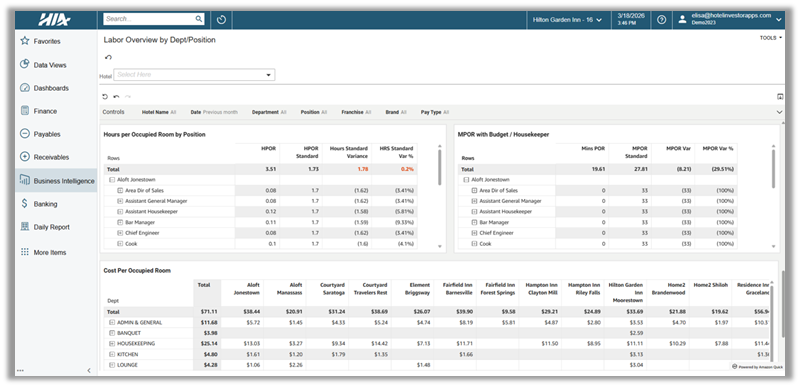
- Minutes Per Occupied Room (MPOR): This is your baseline for housekeeping efficiency, and it’s often the first place where small inefficiencies begin to compound. A few minutes extra here and there doesn’t seem like much, but MPOR drift can quickly snowball, especially across an entire portfolio.
- Cost Per Occupied Room (CPOR): This is where effort translates to dollars. It allows you to compare labor performance across properties on equal footing, regardless of size or rate tier. It’s also one of the clearest ways to understand whether labor is running efficiently at a portfolio level.

*This is a sample of HIA’s labor dashboard showing information available at the department level.
- Standard Hours vs. Variance to Standard: This shows whether your staffing levels are aligned with what the property should be running at for a given occupancy. You can hit your CPOR target and still be consistently running over your expected hours. When that happens, it’s usually a sign of a deeper issue.
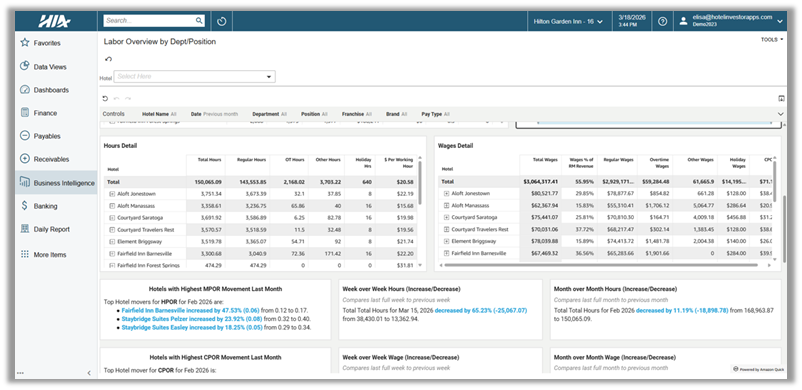
- Overtime Tracking: This metric is critical to show you where pressure is actually building. It can point to scheduling gaps, turnover, or operational strain, but only if you can see it early enough to respond. When it’s visible mid-period, it’s a fix. When it shows up in payroll, it’s already a result.
- Hours and Wages by Department, Day of Week, and Position: Without this level of detail, you’re left reacting to totals. With it, you can see exactly where labor is building (by department, by shift, by role) and understand what’s driving it. That’s the difference between knowing there’s a problem and knowing where to act.

*This is a sample of HIA’s labor dashboard showing information available at the department level.
Taken together, these metrics give you more than visibility. They give you control. And when you can see all of that while the week is still in progress, you’re no longer reacting to labor. You’re managing it.
What Labor Intelligence Looks Like at the Portfolio Level

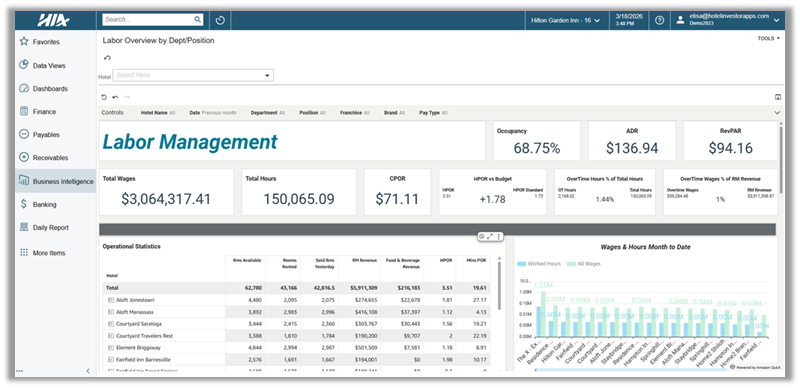
*This is a sample of HIA’s labor dashboard showing information available at the portfolio level.
The real value of tracking these metrics comes from being able to see how they perform across your entire portfolio. At the property level, labor metrics tell you what’s happening. At the portfolio level, they tell you where to act.
That’s why labor intelligence matters so much at scale. With it operating across your entire portfolio, teams start to change how they operate:
- GMs stop relying on instinct alone and start monitoring MPOR and CPOR daily against budget to catch when a department starts drifting.
- Controllers can drill down into labor costs by property and department to uncover inefficiencies in real time.
- CFOs can start benchmarking CPOR across brands, regions, and property types in one place, using consistent data instead of stitched-together reports.
- Ownership groups can keep a finger on the pulse of operations without waiting on manual reporting.
The visibility it provides is invaluable because it lets your teams focus their attention on making the most impact across their entire portfolio instead of reacting to isolated issues at individual properties. And as AI-driven analysis continues to evolve, having payroll data unified with operational data in a BI platform will become even more valuable.
Why the Integration Quality Determines the Intelligence Quality
While establishing a labor intelligence solution is a large part of the equation, you also have to take into consideration how that data is actually getting into your system. Not all integrations are equal, and the way data is delivered directly impacts how usable it is.
- File transfers and scheduled batch processes: This is where many legacy systems still operate. Data is exported, transferred, and uploaded on a schedule. That introduces lag, creates gaps, and often leaves labor data out of sync with the rest of the operation by the time it’s available.
- Direct API connections: This is a step forward. It allows labor data to be delivered more frequently, but it does not automatically guarantee clean, standardized, or complete data.
- Two-way API integrations: This is where integration starts to actually support real-time decision-making. With a two-way API (like the one between HIA and Inova Payroll), data flows continuously between systems, reducing delays, eliminating manual steps, and improving overall accuracy.
But even the best integration can only deliver what it’s given. Just like we’ve seen with the AI trends recently, the quality and cleanliness of your data matters. Better inputs equal better outputs. If your underlying data is delayed, incomplete, or inconsistent, even the right metrics won’t give you a clear picture of what’s actually happening.
To get the cleanest data, you have to start with a solid foundation. A single source of truth. And hospitality ERP is a way to do that. It unifies and standardizes all your labor, financial, and operational data, so you know that what’s being delivered through the integration is clean, consistent, and comparable. It’s what really allows your intelligence layer to actually function the way it should. Because at the end of the day, it’s not just about how fast your data moves; it’s about how reliable it is when it gets there.
If you want to see what that looks like in practice, schedule a demo.

Jaime Goss has over a decade of marketing experience in the hospitality industry. At Hotel Investor Apps, Jaime heads up marketing initiatives including brand strategy, website design, content, email marketing, advertising and press relations.